Flex Builder 3.0 sneak peek: debugger tooltips

In a way this is a small thing, but it is certainly one of the most-requested debugger features, and I’m relieved that this is finally in the product: debugger tooltips. It really should have been in Flex Builder 2.0, but it didn’t make it in due to time constraints.

So you’re debugging:
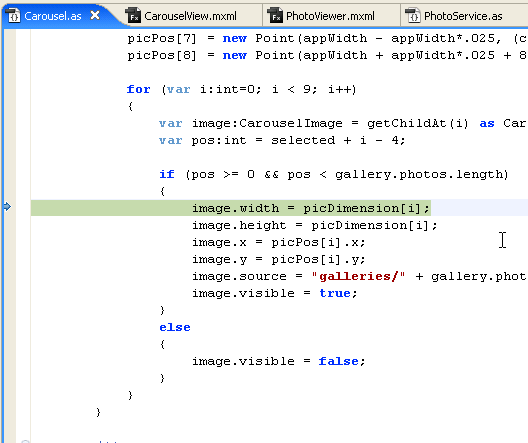
1.png

You want to know the value of ‘i’:

2.png

Flex Builder is smart enough to figure out, from context, what expression you probably wanted to see, which is often more than just the single token under the cursor. In this example, when you hover over picDimension, Flex Builder is smart enough to realize that what you probably actually want to see the value of is picDimension[i], not just picDimension:

3.png

picPos[i] is an instance of class Point:
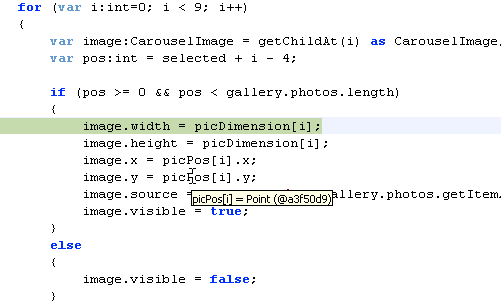
4.png

In the above screenshot, we didn’t automatically show you picPos[i].y, because there is an easy way for you to get that yourself, by hovering over the “y” at the end of the expression, as shown here:

5.png

If you hover over the “length” part of the expression “gallery.photos.length”, we figure out from context what you are looking for — you want gallery.photos.length, not just some global called “length”:
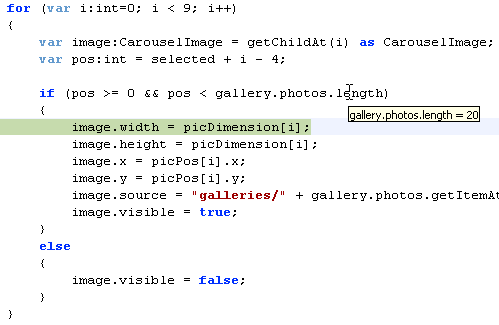
6.png

You can select an expression and hover over it:
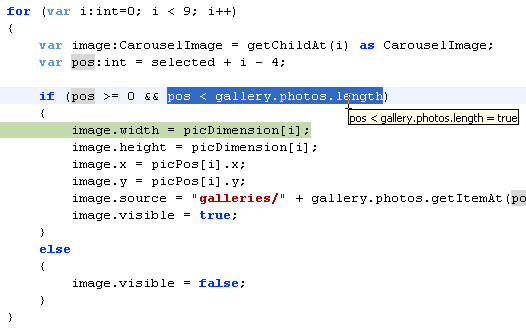
7.png

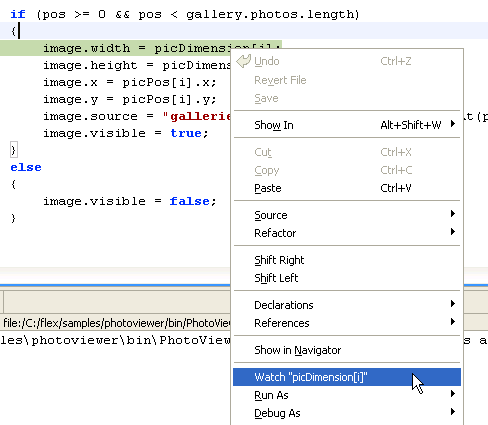
Finally, in all of the above cases, if you right-click, there is a new “Watch” command, to add the expression to the Expressions view. As with the tooltip, it figures out from the current context what expression you probably wanted to watch:
8.png

And in case you missed it, Ted has been posting other sneak peeks all week.

12 Comments so far

  1. Geoffrey Williams on June 8th, 2007

    Now that’s cool. Even the little things that add up.

  2. David Coletta on June 8th, 2007

    Congrats on getting this in. I had heard it was on the stretch list for 3.0 and I’m really looking forward to being able to use it. Will it be in the upcoming beta 1 release?

  3. mike on June 8th, 2007

    Yes, it will be in the upcoming beta 1 release.

  4. Mitch on June 8th, 2007

    :-) That might be the most exciting feature for me yet - especially with the way the variables list performs on the Mac in Eclipse!

    THANKS!

  5. mike on June 8th, 2007

    Hang on to your seat, Mitch — the upcoming public beta doesn’t have any debugger performance improvements yet, but if you could see the build that’s on my machine right now, it might make you very happy…

  6. AnotherMitch on June 9th, 2007

    This is just awesome! Thank you so much! Just wanted you to know that we appreciate your work :)

  7. Kyle on June 9th, 2007

    YAY! I am so glad that this has arrived, I have been waiting for this feature along time. I also agree that it should have been in version 2.0 as well!

  8. Dennis on June 24th, 2007

    Does Flex builder have the feature of changing syntax coloring? Or is it going to be a "hand job" as it was in FB2?

    Thanks

  9. mike on June 25th, 2007

    Hi Dennis,

    I’m not sure. Please log an enhancement request at http://bugs.adobe.com/flex

  10. [...] In addition, Mike previewed the changes/additions in the upcoming FlexBuilder 3 release such as: + Debugger tooltips + Right-click "Watch Expression" + Hierarchical variables view + Faster stepping + No-launch [...]

  11. Drew Shefman on October 9th, 2007

    Mike,

    At Max you mentioned that FB3 could hide private variables for faster debugging. Is there a way to set that as a toggle - so that you could see the privates if you wanted to?

  12. mike on October 9th, 2007

    Drew,

    Actually the toggle is not for faster debugging — it is for simpler debugging. Since the list of members in the built-in Flex classes is so long, the purpose of this toggle is to make the list of members shorter, so that it is easier to find the ones you usually care about.

    To toggle this, go to the local menu of the Variables view (the down-triangle) near the upper right of the Variables view), then Flex > Show Inaccessible Member Variables.

Leave a reply