Common E4X pitfalls

As cool as I think E4X is, there are a few things about it that can throw you off when you're getting started (they certainly took me a while to get used to). I thought I would pass on these tips.

1. Set resultFormat="e4x" on your HTTPService

The default resultFormat for an <mx:HTTPService> is "object". When you are retrieving XML data, "object" probably isn't what you want. And you definitely don't want "xml" -- that is a legacy format.

The difference is in what comes back in the lastResult. If you use the default of "object", then the lastResult is an Object with regular ActionScript properties on it. (Actually it's an ObjectProxy, but that's an implementation detail.) If you use "e4x", then the lastResult is an XML object which you can easily parse with E4X expressions.

So when would you want "object"? Well, I'm not really sure. I always use "e4x".

2. E4X expressions don't reference the topmost tag of the XML

Say you have an <mx:HTTPService> called myService, with resultFormat="e4x", and a call to it returns this document from your server:

<?xml version="1.0"?>
<people>
  <person>mike</person>
  <person>sho</person>
  <person>nj</person>
</people>


The data is now in myService.lastResult (or, if you are in the result event handler, the data is in event.result.) How do you get an XMLList for all of the <person> elements?

It is a very common mistake to think that your E4X expression needs to specify the top-level <people> tag:

var personNodes:XMLList = myService.lastResult.people.person; // wrong 


That doesn't work. You should think of the myService.lastResult as being synonymous with the top-level node. So the way you get a list of the <person> nodes is:

var personNodes:XMLList = myService.lastResult.person; // right 


3. Use for each, not for

ECMAScript has had for (key in collection) for a long time. But notice that when you use this form of the for loop, the looping variable is the key into the collection, not the value of an entry in the collection. Thus, inside the loop you would typically write collection[key] to refer to the value.

E4X adds an additional syntax to the language (which can actually be used on any collection, not just E4X expressions): for each (value in collection). I suspect they did this because using a for loop is rather painful and inefficient -- who wants to write code like this?

for (var key:* in myService.lastResult.person)
{
  // Since we used 'for' instead of 'for each', we now
  // have to write this ridiculous and inefficient code:
  var value:* = myService.lastResult.person[key];
  ...
}


So when writing E4X code, you almost always use for each:

for each (var value:* in myService.lastResult.person)
{
  ...
}


The only thing I wish was different was, it took me a long time to memorize that "for" gets keys and "for each" gets values. In general I am pretty good at keeping track of lots of little details, but with so many different variations on foreach keywords in all the languages I use from time to time -- ECMAScript, Java, C#, PHP, Bourne shell, C shell, etc. -- I always find it hard to remember the foreach syntax for any given language, and the added complexity of having two collection-looping syntaxes in ActionScript is almost more than my little brain can bear. I wish there was for keys (var k:* in collection) and for values (var v:* in collection) or something like that.

4. Use for each (child in parent.*), not for each (child in parent)

Say you have this document:

var mydocument:XML =
  <root>
    <cat>
      <mouse />
      <mouse />
      <mouse />
    </cat>
  </root>
var cats:XMLList = mydocument.cat; // returns list with one entry 


You now want to iterate over all the mice that are inside those cats.

Well, for getting the properties of a regular ActionScript object, you write code like this:

var o:Object = ...;
for each (var property:* in o) ...


So you might think that you do the same thing here:

for each (var mouse:XML in cats) ... // wrong 


Alas, E4X is different. In E4X, "cats" is actually a collection -- a list of all the <cat> nodes (remember, "cats" is an XMLList, with just one entry in this example), and when you iterate over "cats", that means you want to get one <cat> each time through the loop.

To fix this, you instead use an E4X expression that specifies exactly which child nodes of the <cat> you want:

// iterate over all immediate children
for each (var mouse:XML in cats.*) { ... }
 
// or if you prefer: iterate over only those immediate
// children that are <mouse> nodes
for each (var mouse:XML in cats.mouse) { ... }


5. E4X intentionally blurs the distinction between XML and XMLList

When you begin to learn E4X, you learn that there are two main data types, XML and XMLList. That seems simple enough. But then after a while, you start to notice places where it seems like the "wrong" type is being used, or where impossible things are happening.

var mydocument =
  <root>
    <rabbit name="Brownster Johansson McGee" />
  </root>;
 
// 'mydocument.rabbit' means to get a list of ALL <rabbit>
// nodes, so myPetRabbit must be an XMLList, right?  But
// I'll call my variable 'myPetRabbit', not 'myPetRabbits',
// because I happen to know that I have only one pet
// rabbit.
var myPetRabbit:XMLList = mydocument.rabbit;
 
// What's her name?  Hey wait a minute, "her" name?
// Why does this next line work?  Isn't myPetRabbit an XMLList?
// What does it mean to get an attribute of a list??
trace(myPetRabbit.@name);


The reason this works is that E4X intentionally blurs the distinction between XML and XMLList. Any XMLList that contains exactly one element can be treated as if it were an XML. (Furthermore, in this example, even if 'myPetRabbit' held a list of more than one node, myPetRabbit.@name is still a legal expression; it simply returns a list of all "name" attribute nodes of all of those <rabbit> elements.)

In fact, if you search the E4X spec (PDF) for "blur", you will find 15 usages of the phrase "... intentionally blurs the distinction between...."

For example, another place where this blurring is evident is in the behavior of XMLList.toString(). As the Flex docs say:

  • If the XML object has simple content, toString() returns the string contents of the XML object with the following stripped out: the start tag, attributes, namespace declarations, and end tag.
  • If the XML object has complex content, toString() returns an XML encoded string representing the entire XML object, including the start tag, attributes, namespace declarations, and end tag.

So if an XMLList contains <node>hello</node>, then toString() will return "hello"; but if the list contains <node>hello</node><node>goodbye</node>, then toString() will return "<node>hello</node><node>goodbye</node>" (not "hellogoodbye"). Presumably this decision was made in an effort to achieve "do what I mean" behavior, where the output would match what developers most often intended; but personally I find it a little confusing. If you really need the full XML version of an XMLList that contains simple content, use toXMLString() instead of toString().

6. Warning, a simple-looking expression can be expensive

When you are working with ordinary Objects, there is nothing wrong with writing code like this:

var x:Object = ...;
if (x.y.z == 3)
  foo(x.y.z);


That code will usually run very fast. The only possible problem is if "y" or "z" is actually a getter with a slow implementation, but that doesn't happen too often.

But with E4X, it is much more likely that repeating an expression such as "x.y.z" will mean that an expensive lookup operation has to be done a second time:

var mydocument:XML = ...;
if (mydocument.cat.mouse.length() == 3)
  foo(mydocument.cat.mouse);


This looks very similar to the plain-Object example, but the difference is that "mydocument.cat.mouse" is actually executing a whole lot of code behind the scenes. It has to walk through your XML structures, figure out which XML nodes match the given expression, and then create a new XMLList containing only those nodes.

So if you need to re-use the result of an E4X expression, you will usually want to save it in a temporary variable:

var mydocument:XML = ...;
var mice:XMLList = mydocument.cat.mouse;
if (mice.length() == 3)
  foo(mice);


The debugger can help

If you debug your app, the Variables will can help you see what values have been assigned to your XML and XMLList variables. The main pane of the Variables view shows a hierarchical view of the XML variable, and the detail pane shows the full XML text:
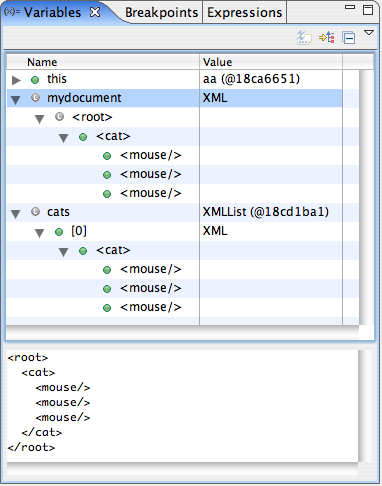
XML variables

44 Comments so far

  1. Chris Luebcke on March 13th, 2007

    Thanks Mike, this is great stuff--I managed to get most of this figured out the hard way, but I wish I could go back in time about four months and read it to my former self :) I definitely hadn't considered the cost of deep expression evaluations, and I'll definitely keep an eye on that.

    The debugger can certainly help in the variables view, but I've never been able to get an expression in e4x to work in the debugger's expressions tab. Is there some trick to it, am I just doing it wrong, or is it just not supported?

    Anyway, thanks again, definitely bookmarking this one.

    • Chris
  2. mike on March 13th, 2007

    The expressions view can't handle E4X expressions, unfortunately.

    Yeah, the tricky thing with a post like this one is that when someone is learning E4X, they are unlikely to find this post before they start running into these stumbling blocks. Maybe I should see about getting something like this added to the docs...

  3. Tracy Spratt on March 13th, 2007

    Regarding XML/XMLList, if you want an XML "node" from an expression, you must use the [0].

    var xmlPetRabbit:XML = mydocument.rabbit.(@name=='Brownster Johansson McGee')[0]; trace(xmlPetRabbit.toXMLString());

    Correct, Mike?

  4. Mozilla By on March 14th, 2007

    Thanks a lot Mike, very useful.

  5. mike on March 14th, 2007

    Right, Tracy, if you want the XML node, you must put [0] at the end of the expression.

    Personally, I usually just get the XMLList, and treat it as if it is an XML; but that is a matter of taste. The disadvantage of my way is that at runtime, if the XML turns out to actually have two or more matching nodes, I will get a runtime error once I try to do some operation on my variable which is legal for XMLList but not for XML. But with your way, putting [0] at the end of the expression in order to explicitly take only the first matching node, if there is more than one matching node you won't get any runtime crashes.

  6. alex on March 30th, 2007

    An excellent sset of notes Mike - very useful. I have been trying to bind some xml to a datagrid and was coming across major hassles - i was using arrays and objects - i finally decided to put everything in xml and then e4x, and i found your blog :-) However could u explain something else - i am trying to bind the httpresult (set to e4x) - i basically want a datagrid that shows a table in my database - columns/rows - can i get the binding to just populate the columns automatically i.e. without knowing the node names beforehand? at the moment i can only get the data visible if i bind it to a specific node - so i have to know the node name first - but i wish to use this to access any table i wish. Is this doable with e4x?

  7. mike on March 30th, 2007

    Hi Alex,

    To have a DataGrid figure out the columns automatically, you can just just omit the 'columns' attribute. If you do that, the DataGrid examines the incoming data and creates columns on its own. If it doesn't work quite the way you'd like, and you would like to write your own code to do the same thing, you can take a look at DataGrid.generateCols(), and write your own code that does pretty a variation on the same thing. Is that what you were asking?

  8. alex on April 2nd, 2007

    Hi Mike - i found out that my xml was built wrongly - what i had to do was wrap each row of my table info in a <row> tag - so my <root> tag was followed properly by <row>s - previously it wasn't. This caused problems with the datagrid parsing the xml properly. However, i then came across another problem. If my service is setup like so…

    <mx:HTTPService id="table_data" showBusyCursor="true" method="POST" result="getData(event)"
    url="http://file.php&quot; useProxy="false" resultFormat="object">

    … and if my getData() function sets this…

    showArrayResult.dataProvider = table_data.lastResult.data.row;

    …where data is my root tag - everything binds perfectly. Nice columns, accessing any table - gr8. But - if i set the resultFormat to e4X - i cannot for the life of me get the columns to bind - the datagrid seemks to just ignore the resulting information.

    showArrayResult.dataProvider = table_data.lastResult.row; //shows nothing

    • do you have ideas on what could be the problem?
  9. mike on April 2nd, 2007

    I don't, Alex, sorry. Try posting to the 'flexcoders' list on Yahoo Groups. Also include a portion of the XML that is coming back to your app.

  10. alex on April 2nd, 2007

    Will Mike - thanx anyway

  11. chitra on April 11th, 2007

    Hi Mike

     I have a problem regarding communication between flex and servlet.
    

    I tried to send a request from flex in xml format. In servlet side i m getting the request using request.getparameter() method. It is working fine. I want other ways to get the request in servlet class.

    could you please give me solution for this problem?

    Thanks in advance chitra

  12. [...] Common E4X Pitfalls [...]

  13. judah on June 8th, 2007

    Could you give an example of converting an XMLList to an Array? I got it to work manually but it just added about 100 lines more of code since I couldn't use an ArrayCollection.

    public function resultHandler(event:ResultEvent):void {

    trace(&quot;result :&quot; + event.result);
    var myXML:XML = XML(event.result);
    var ac:ArrayCollection = new ArrayCollection();
    var newArray:Array = myXML.menu as Array;
    ac.source = newArray;
    ac.refresh();
    trace(ac.length); // len
    //linkBarNav.dataProvider = ac;
    

    }

  14. mike on June 8th, 2007

    Judah,

    In general, new XMLListCollection(myxmllist).toArray() is a convenient way to convert the elements of an XMLList into an array. But in the particular case of what you're trying to do in your sample code, I tried it, and that didn't work, because when you call that, the individual array elements are of type XML, and when you assign that to the data provider of a LinkBar, there is code farther downstream that doesn't expect the elements to be of type XML.

    So, to convert an XMLList into an array of strings, do this:

    var newArray:Array = []; for each (var elem:* in myXML.menu) newArray.push(String(elem));

  15. Erik Hansen on November 30th, 2007

    Thanks! I just went through my own code that wasn't working and as I read this, fixed line by line every little mistake I had made, practically in order. Thanks for saving me a bunch of time.

  16. [...] Very clear and concise explanation of e4x and processing XML returned from a Flex2 HTTPService. [...]

  17. super on March 6th, 2008

    This xml stuff in flex are REALLY anoying if you start to work with it, expecially the tree view. forget collections! get the XML by index [0] on result. Another thing.. if you trace(yourXmlListObj); you will get a nice root tag or so, but that belongs to the obj itself! Unclear? Yeah!!! So you cant trust the debugger to show the correct content..

  18. mike on March 6th, 2008

    @super, I don't really follow your point re: trace(yourXmlListObj), but perhaps the problem you are running into is that you need to call toXMLString() -- in other words, trace(yourXmlListObj.toXMLString()). That will always show exactly what XML is actually in the object.

  19. Steven Rieger on March 10th, 2008

    Hi Mike,

    Great stuff thank you. I am learning e4x and have a question for you. I have been returning data from my webservice as "object". I'm having troubles with that and decided to try using e4x. I need to convert my xml into a value object. I'm trying to come up with a single function to iterate through an xml document ( returned from my web service ) and through introspection, copy the data into a new object. I'm wondering if you can review the code I have for copying simple objects to objects and help me port it to create objects from xml.

    If you are interested can you shoot me an email? I think this would be very kewl to provide for others as well.

    Thanks,

    STeveR

  20. mike on March 10th, 2008

    Hi Steve, I'm sorry but I don't really have time to help out with that. You could post the code to the "flexcoders" list, people there might be able to help out. Also, take a look at ObjectProxy, and at RemoteObject, and also at this post from Darron Schall: http://www.darronschall.com/weblog/archives/000247.cfm -- and see if those help at all.

  21. Steven Rieger on March 11th, 2008

    Hey Mike,

    Thanks anyhow. I am currently using the object translator from Darron Schall. I'm trying to rewrite it now parsing XML instead of objects. I'm close. I'm stuck in the same place Darron's code gets stuck. Handling complex objects.

    I'll try posting to code as you said and see what happens. Thanks again. . .

  22. ian on April 6th, 2008

    hi,

    please, is it somehow possible to find out all the names of node's children?

    i mean, you can use "mydocument.cat" but what if you don't know that there is a node named "cat"?

    i could check all the children-node's names, pick only the unique ones. but i was wondering if there's a better way...?

    thanks a lot in advance!

  23. Venky on May 8th, 2008

    I have been struggling to solve empty result issue with default resultFormat. I found out that e4x would be the best option, but this is the simple and best explanation I have seen on the web. Thank You!

  24. [...] mikemo » Common E4X pitfalls (tags: e4x flex xml development) [...]

  25. Flex Coding « Panduramesh’s Weblog on September 19th, 2008

    [...] :: Filtering an XML Object In ActionScript to Create Related Combo Boxes in Flex Mike Morearty :: Common E4X pitfalls Events Oliver Merk :: Flex Custom Events - Part 1 Tink :: Custom Events in AS 3.0 (don’t forget [...]

  26. Flex with Java « anil4it on September 30th, 2008

    [...] :: Filtering an XML Object In ActionScript to Create Related Combo Boxes in Flex Mike Morearty :: Common E4X pitfalls Events Oliver Merk :: Flex Custom Events - Part 1 Tink :: Custom Events in AS 3.0 (don’t forget [...]

  27. Val on October 3rd, 2008

    Hi Mike, I have a question ... If I have a XML like this : var mydocument:XML = <root> <cat id="1"> <mouse /> <mouse /> <mouse /> </cat> <cat id="2"> <mouse /> <mouse /> <mouse /> </cat> </root>

    How can I get the cats nodes without their children (mouse nodes) ? Thanks, Val

  28. Flex Coding « Adiflex’s Blog on October 25th, 2008

    [...] :: Filtering an XML Object In ActionScript to Create Related Combo Boxes in Flex Mike Morearty :: Common E4X pitfalls Events Oliver Merk :: Flex Custom Events - Part 1 Tink :: Custom Events in AS 3.0 (don’t forget [...]

  29. Lyubox on November 3rd, 2008

    I started to learn Flex a week ago but for the last 15 min ( from your blog ) a have learned more then for the past week. Good job. Take care!

  30. mike on November 3rd, 2008

    Thanks, Lyubox!

  31. Pete on January 8th, 2009

    Thank you so much! This is great, it answered all of the nagging questions that were driving me crazy today.

    I am new to Flex and E4X, this stuff is way cool. I was hitting my head on most of your discussion points!

    This should be the start of 'the missing manual' for Flex.

  32. [...] Don’t forget that if myobj is of type XML or XMLList, then String(myobj) and myobj.toString() will work, but may or may not give the result you wanted; you may want myobj.toXMLString() instead.  See part 5 of Common E4X Pitfalls. [...]

  33. Swaroop on January 29th, 2009

    I'm coding after a long time and totally forgot that "E4X expressions don't reference the topmost tag of the XML". Ugh, thanks a ton for reminding me :)

  34. shen on June 27th, 2009

    I have following XMLLIst I want to get books and Songs as tabnavigator tabs(dataprovider),Is there way to get XMLLIst to dataprovider or array collection.because under the dynamic properties always change books,songs sometimes it may books,films,songs. so I want to appear tabnavigator tabs books,films,songs..

    <dynamicProperties> <Books> <bookNumber>1</bookNumber> </Books> <Songs> <songNumber>2</songNumber> </Songs>
    </dynamicProperties>

    Thank you in advance,Hope flex star may help me!!

  35. mike on June 27th, 2009

    Hi Shen,

    The Adobe Flex forum is probably a better place to ask: http://forums.adobe.com/community/flex

  36. My on October 21st, 2009

    e4x sucks, they should have just put in xpath support like the rest of the universe has.

  37. Anonymous on January 14th, 2010

    Thanks! You saved me a good amount of time.

  38. Steven Rieger on February 13th, 2010

    Hey Mike,

    I'm struggling with some XML issues and hoping you can help me out here. . .

    I am trying to use the advanced data grid with my xml to group the data. I can not for the life of me figure this out can you help?

    I have a demo with view source enabled here if you can take a peek at it and let me know your thoughts.

    http://estar.lmsnet.com/lmsdev/testgrouping.html

    I"m trying to group data on a Category and then display the PathNFileName.

    Thanks!!!!

  39. mike on February 14th, 2010

    Hi Steven, a better place to ask would be the Flex forum: http://forums.adobe.com/community/flex/flex_general_discussion

  40. mike on April 8th, 2010

    mike,I'm mike too! great work!

  41. Anonymous on April 15th, 2010

    Yes I agree . Mike you saved me so much time and frustration , just this morning I was getting nothing returned from my PHP and then I read your post and problem solved.

    Great. Thanks!

  42. Lekha on March 29th, 2011

    It proved helpful. Thanks.

  43. Lee on April 10th, 2011

    Mike! You Rock! I was stumped on how to do this app I was writing. I'm just learning flex/flash but I"m coming from alot of web development languages(all the way up the basic tree of languages then into php/mysql) So some things are still a bit confusing for me and the OOP is something I've been familiar with but never really applied in the languages I've worked with. Then here I am writing a flex based xml editor(which I can do easily in php) its amazing how much I was over thinking things in the first place and I didn't realize how simple it was until I read these tips of yours. now I have a really sweet little 'simple' editor thats given me a really good grasp of things throughout its creation. I'm using php for the backend. The part that helped me out the most was zeroing in on exactly what the e4x was capable of. While I was getting empty datagrids and couldn't figure out why, I seen your first comment about adding the 'resultFormat' to the HTTPservice request. That made my texarea editing box much simpler. and the file saves so much cleaner and neater. Then the comment that E4X expressions don't reference the topmost tag of the XML. I was having trouble populating a datagrid so that gave me an idea, I had one line: '{userRequest.lastResult.game.quote}'.I deleted ONE word and made it '{userRequest.lastResult.quote}', and saved and ran it. Everything loaded perfectly. As a side effect of having the text area AND the datagrid I was able to edit the document in the text area, and upon saving it updated the datagrid! Combine that with 'editable'. Its the best foundation I could ask for while learning flex 4 AND learning out to use php as a backend for it. Thanks again for putting these tips out for us. You just gave me my flex programming 'click' :)

  44. Lee on April 10th, 2011

    And of course added '@' before the attribute names used in the datagrids 'datafield'.....just throwing that in :)

Leave a reply

*
To prove you're a person (not a spam script), type the security word shown in the picture. Click on the picture to hear an audio file of the word.
Click to hear an audio file of the anti-spam word